RLeal

Active Member
Registered User
Joined
Jun 19, 2021
Messages
16
Hello,

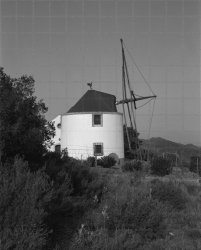
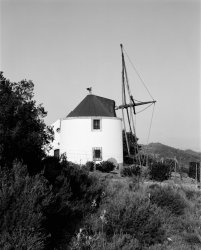
After my first shoots were ruined by a faulty fomapan batch, this is my first flawless 4x5 image. No post processing, just scan
conversion and dust removal.
Fomapan 100 with an 4x5 Intrepid Camera MK4, Nikon Nikkor W 150mm F5.6, Kodak HC-110.
Moinho_low_2.jpg
 
Well done. Well seen and composed. On this screen, the white wall seems a little but bright, but it looks as if the neg itself is fine.
 
Well done. Well seen and composed. On this screen, the white wall seems a little but bright, but it looks as if the neg itself is fine.

Thank you David.
You're right, the wall is a little bright, I need to refine my metering and/or development times. This time I will try to compensate that in the editing.
 
Yea a little to bright, the contrast works well, I can see the deepest shadows are really blocked up, I thinks that's the scanning workflow you have used causing that, otherwise a nice image and the fact that it turned out as you say flawless is a great step forward
 
Thank you Martin.
I've scanned the negative on a Epson V800 as a positive (DNG), using the Epson holder, and then i've converted it with a trial version of the Negative Lab Pro.
I need to play with the settings and try to edit the image (also a learning process).
 
I think you need more control over the scanned file, neg lab pro does not give you that, watch some of my vids or Ian on scanning on YouTube, we put a lot of time and effort into getting the control of highlights and especially shadow from a linear raw scan
 
Thank you Martin.
I will follow your advice.

Ricardo.
 
Martin, after seeing your videos i've scanned the negative again in SilverFast, this time with the settings for a linear scan in SilverFast that i've read on the ColorPerfect site,
  • Scanned as Positive, 16bit HDR Raw
Then i've used a trial version of ColorPerfect to convert the resulting tif file, this is the result (ignore the grid, i think that is the watermark from ColorPerfect, I'm still deciding which software to buy)

SF_Positive_16bHDR.jpg

Now I see the difference and I understand what you were saying.
I think this is my starting point to do some editing.

(sorry for turned this post into a scanning help guide)
 
Last edited:
Yea looking better, the windmill looks better in tonality and there is more detail revealed in the shadows, good result :), VueScan is very good and a lot less complicated than Silverfast,
 
Thank you Martin, you helped me a lot.

The SilverFast came with the scanner, I will try to do the same but with VueScan (also a trial version) and compare the results.

In your videos, when you open the file in Photoshop, it ask you for the gamma profile, but in my case Photoshop open the file without asking for anything.
 
Silverfast must be applying a profile then, the scan should come into PS without a profile, then you choose gamma 2.2
 
The mill is looking very much better. Well done. That white wall is nicely rounded.
May I offer a small plug for VueScan? SF came free with my scanner too, but I could never quite get my head into all the nooks and crannies of operating it. The deciding factor for me was that VueScan works for any scanner, (every scanner I’ve ever owned) but if you get a new one, you have to pay for a new version of SF and it’s not cheap. Some people swear by SF and it does seem to be packed with bells and whistles.
You may be richer than me, of course. Or cleverer and more patient. Other members will certainly be better-informed.
 
@martin henson
Maybe that's it, I'll see.

@David M
Thank you David.
I'm not rich for sure, if you notice, I spent the last few days using trial versions of some programs :)
I also find SF a bit complicated, I will follow your advice and try VueScan, another trial version :)
 
Very sensible to try before you buy. Don’t just take my word for it. Other members may have more experience and better advice.
Both of them have features that you will almost certainly never use, rather like Photoshop.
 
The thing to remember is you do not adjust anything in either software, in vuescan you need to scan it as a raw file, no profile will be added and it should open up in photoshop were you apply the 2.2 gamma as a negative, colorperfect will convert it to a positive much better than photoshop alone will do, just follow the steps in the videos
 
One small tip I've learned.
If you are coming to scanning from the darkroom, you may need to adjust your development times a little. In the darkroom, you can print through almost any density, given time and patience, but if a scanner won't penetrate the neg; it simply gives up trying. Consequently it's important to avoid over-development. On the other hand, a scanner seems to be able to extract almost invisible detail from underexposed shadows. These are my own experiences and may not be universal.
 
It’s strange , have found negatives that are over exposed by say 1 stop seem to scan better, as regards development you could well be right
 
Yes, you may well be right. The important thing seems to be not letting the histogram overlap the ends.
 
Back
Top